← See all features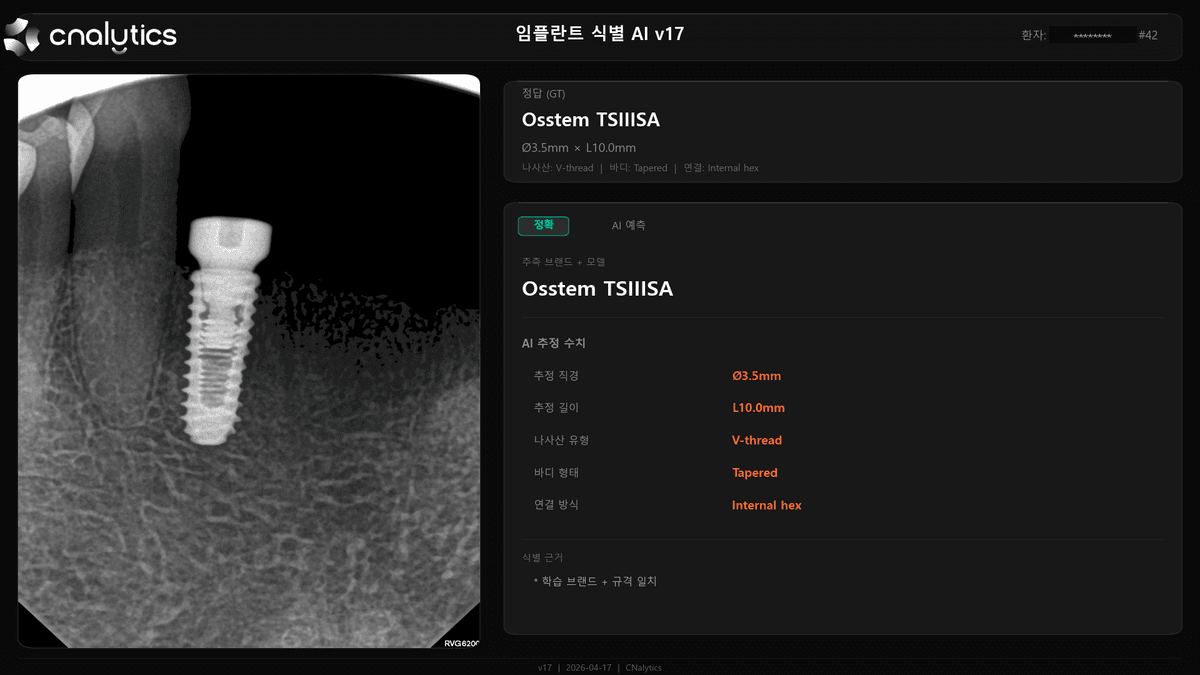
CNalytics · Clinical Dental AI
Implant Identification AI
Upload panoramic X-rays and AI automatically detects placed implants, identifying their brand and model. Matches against a curated library of 22 major brands and 36 models with clinical-grade accuracy.
- Auto-detect implants from X-ray
- Brand & model identification (Osstem, Neobiotech, etc.)
- Compatible components & specifications matching
Implant Identification AI
CNalytics Implant Identification AI automatically recognizes placed implants from panoramic X-rays and identifies their brand and model. CNalytics matches against a library of 22 major brands and 36 models with clinical-grade accuracy and shows compatible components and specifications.
How to use
- Step 1
Upload X-ray
Upload a panoramic X-ray to CNalytics.
- Step 2
Auto implant identification
AI detects implants and matches brand and model.
- Step 3
Check compatible parts
Review the identified model's specifications and compatible components.
Frequently asked questions
The most common questions before getting started with CNalytics